1. Single Point Calculation
Quantum dynamics requires a potential that computes the energy and forces.
PySCIVR supports the following potentials (see pyscivr.potentials for details):
ASEPotential: a wrapper of ASE calculators for PySCIVR. Any quantum chemistry program supported by ASE, as well as neural network potentials such as MACE, can be used.DFTPotential: DFT energies and forces computed by PySCF.ZeroPotential: returns zero for any geometry. Used for calculations that do not require the potential energy, such as pure rotation.H2SplinePotential: an analytical potential of H2 obtained by cubic spline interpolation of a CCSD(T)/aug-cc-pV5Z scan (0.4–1.5 Å, 0.02 Å spacing).
Examples for some of them are shown below.
H2SplinePotential
No additional setup is required.
As in ASE, PySCIVR uses Å for length and eV for energy (see pyscivr.units for details).
Note that the input geometry is given in Å, and the output energy and forces are in eV and eV/Å, respectively.
import numpy as np
import matplotlib.pyplot as plt

from pyscivr.potentials import H2SplinePotential

pot_h2 = H2SplinePotential()

ener_list = []
r_list = np.linspace(0.4, 1.5, 12)

for r in r_list:
    posi = np.array([[0.0, 0.0, 0.0], [0.0, 0.0, r]])
    ener, forces = pot_h2.energy_forces(posi)
    ener_list.append(ener)

plt.xlabel("Bond length (Å)")
plt.ylabel("Energy (eV)")
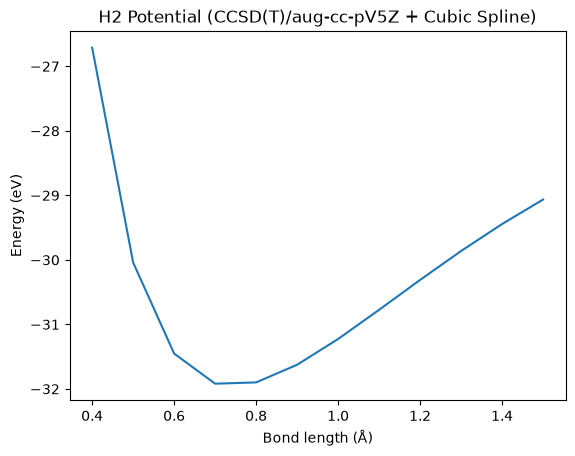
plt.title("H2 Potential (CCSD(T)/aug-cc-pV5Z + Cubic Spline)")
plt.plot(r_list, ener_list)
plt.show()
Batches of geometries are also supported.
ASEPotential and DFTPotential also accept batches, but the geometries are evaluated sequentially inside.
posi_list = np.array([[[0.0, 0.0, 0.0], [0.0, 0.0, r]] for r in r_list])
ener_list_batch_spline, _ = pot_h2.energy_forces(posi_list)

plt.xlabel("Bond length (Å)")
plt.ylabel("Energy (eV)")
plt.title("H2 Potential (CCSD(T)/aug-cc-pV5Z + Cubic Spline)")
plt.plot(r_list, ener_list_batch_spline)
plt.show()
The following examples (ASEPotential with MACE-ANI-CC and ORCA, and DFTPotential) require additional
packages or external programs. They are not needed in the other tutorials, which run without any additional setup,
so these examples can be skipped.
ASEPotential with MACE-ANI-CC
Here, the MACE-ANI-CC neural network potential is used. ASE and the MACE-related packages are required, which can be installed by
uv sync --extra ase
The MACE model is loaded onto the CPU here.
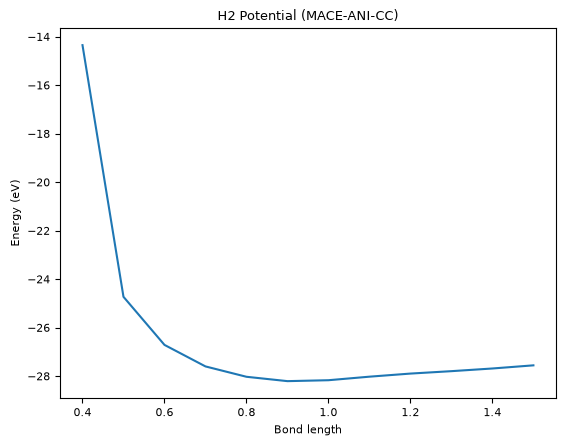
Note that MACE-ANI-CC is trained for organic molecules and is not suitable for the dissociation of H2. It is used here only to demonstrate the usage.
Reference:
D. P. Kovács, I. Batatia, E. S. Arany, and G. Csányi, “Evaluation of the MACE force field architecture: From medicinal chemistry to materials science,” J. Chem. Phys. 159, 044118 (2023).
import numpy as np
import matplotlib.pyplot as plt

from pyscivr.potentials import mace_anicc_potential

import warnings
warnings.filterwarnings("ignore") # Ignore warnings from MACE

r_list = np.linspace(0.4, 1.5, 12)
posi_list = np.array([[[0.0, 0.0, 0.0], [0.0, 0.0, r]] for r in r_list])

pot_mace = mace_anicc_potential(['H', 'H'], device='cpu', num_threads=1)

ener_list_batch_mace, _ = pot_mace.energy_forces(posi_list)

plt.xlabel("Bond length")
plt.ylabel("Energy (eV)")
plt.title("H2 Potential (MACE-ANI-CC)")
plt.plot(r_list, ener_list_batch_mace)
plt.show()
cuequivariance or cuequivariance_torch is not available. Cuequivariance acceleration will be disabled.
Using ANI couple cluster model for MACECalculator, see https://doi.org/10.1063/5.0155322
ASEPotential with ORCA
Here, ORCA is used through its ASE calculator. Calculators of other programs supported by ASE can be used in the same way.
In addition to
uv sync --extra ase
ORCA must be installed separately (free for academic use after registration at https://www.faccts.de/orca/).
Replace path_to_orca below with the full path to your ORCA executable.
Reference:
F. Neese, F. Wennmohs, U. Becker, and C. Riplinger, “The ORCA quantum chemistry program package,” J. Chem. Phys. 152, 224108 (2020).
from ase.calculators.orca import ORCA, OrcaProfile

import numpy as np
import matplotlib.pyplot as plt

from pyscivr.potentials import ASEPotential

import contextlib
import io

with contextlib.redirect_stdout(io.StringIO()): # Suppress output from ASE

    r_list = np.linspace(0.4, 1.5, 12)
    posi_list = np.array([[[0.0, 0.0, 0.0], [0.0, 0.0, r]] for r in r_list])

    path_to_orca = "/path/to/orca"  # Replace with the actual path to your ORCA executable
    profile = OrcaProfile(command=path_to_orca)
    calc = ORCA(profile=profile,
                charge=0, mult=1,
                orcasimpleinput="B3LYP def2-SVP TightSCF engrad",
                directory="orca_work")
    pot_orca = ASEPotential(symbols=['H', 'H'], calc=calc)

    ener_list_batch_orca, _ = pot_orca.energy_forces(posi_list)

    plt.xlabel("Bond length")
    plt.ylabel("Energy (eV)")
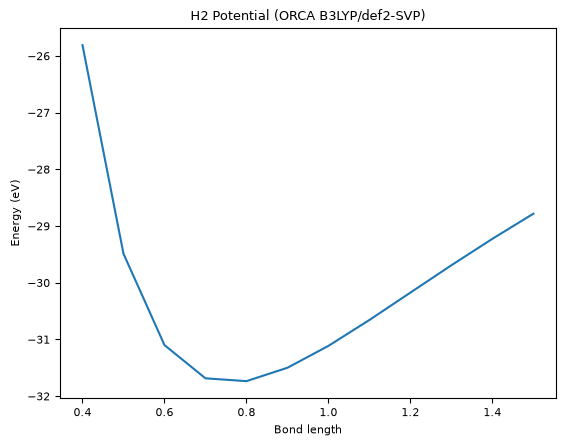
    plt.title("H2 Potential (ORCA B3LYP/def2-SVP)")
    plt.plot(r_list, ener_list_batch_orca)
    plt.show()
DFTPotential
Here, DFT calculations with PySCF are used. PySCF can be installed by
uv sync --extra pyscf
Reference:
Q. Sun et al., “The Python simulations of chemistry framework: 10 years of an open-source quantum chemistry project,” J. Chem. Phys. 165, 102502 (2026).
import numpy as np
import matplotlib.pyplot as plt

from pyscivr.potentials import DFTPotential

r_list = np.linspace(0.4, 1.5, 12)
posi_list = np.array([[[0.0, 0.0, 0.0], [0.0, 0.0, r]] for r in r_list])

pot_dft = DFTPotential(symbols=['H', 'H'], xc='B3LYP', basis='def2-SVP', charge=0, spin=0)

ener_list_batch_dft, _ = pot_dft.energy_forces(posi_list)

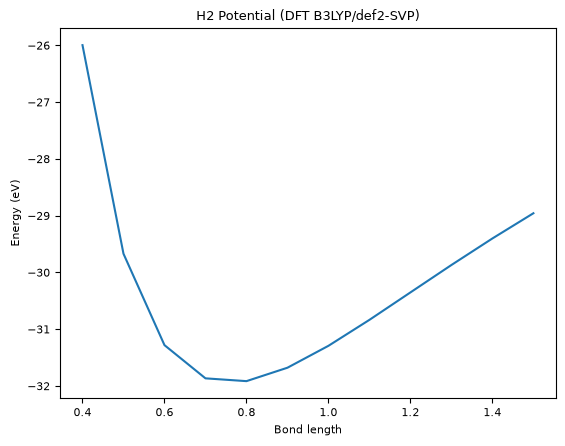
plt.xlabel("Bond length")
plt.ylabel("Energy (eV)")
plt.title("H2 Potential (DFT B3LYP/def2-SVP)")
plt.plot(r_list, ener_list_batch_dft)
plt.show()
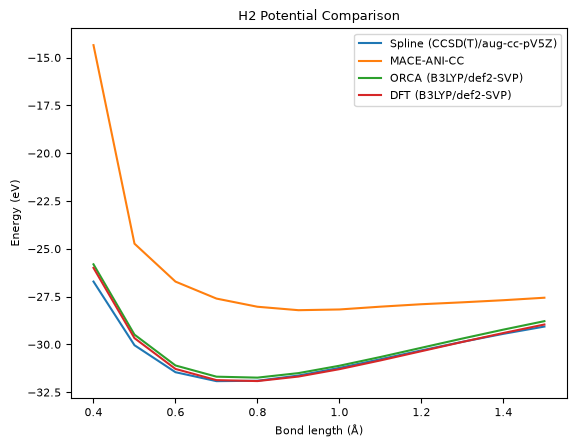
Compare the results from MACE, ORCA, and DFT calculations
plt.plot(r_list, ener_list_batch_spline, label='Spline (CCSD(T)/aug-cc-pV5Z)')
plt.plot(r_list, ener_list_batch_mace, label='MACE-ANI-CC')
plt.plot(r_list, ener_list_batch_orca, label='ORCA (B3LYP/def2-SVP)')
plt.plot(r_list, ener_list_batch_dft, label='DFT (B3LYP/def2-SVP)')
plt.xlabel("Bond length (Å)")
plt.ylabel("Energy (eV)")
plt.title("H2 Potential Comparison")
plt.legend()
plt.show()